Git gets much easier once you can picture the commit graph. Nearly every command you use day to day does one of two things: it adds commits to the graph, or it moves a label to a different commit. This guide explains each in those terms.
You can try every command here in Git Tangle, which draws your graph as you type and asks you to make it match a goal.
Commits and the graph
A commit is a snapshot of your project plus a pointer to its parent: the commit it was made on top of. Following parents back from any commit gives its history. Most commits have one parent; a merge commit has two.
Commits never change. Commands that seem to edit history, like rebase, actually make new commits and move labels to them.
Branches are labels, HEAD is where you are
A branch is just a name that points at one commit. Making a branch with git branch feature copies nothing; it adds a label to the commit you are on.
HEAD says where you are. Usually it points at a branch, and when you commit, that branch moves forward to the new commit. git checkout feature or git switch feature moves HEAD to another branch; git switch -c feature makes the branch and moves to it in one step.
Merge and fast-forward
git merge feature brings feature’s commits into the branch you are on. If both branches have new commits, git makes a merge commit with two parents, and history keeps both lines.
If your branch has no commits of its own since feature split off, there is nothing to join: git just moves your branch forward to feature. That is a fast-forward, and it makes no new commit. --no-ff forces a merge commit anyway; --ff-only refuses to merge unless it can fast-forward.
Rebase
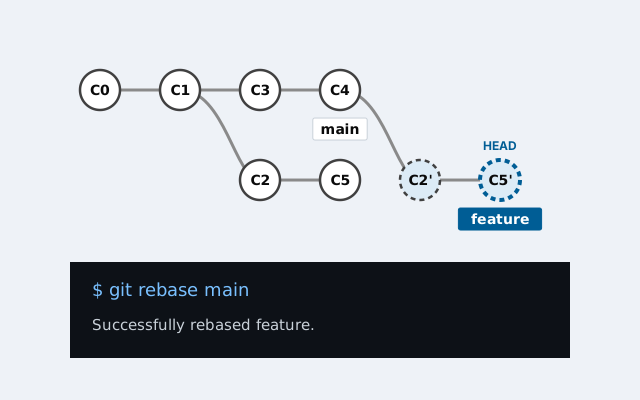
git rebase main, run on feature, takes the commits that only feature has, copies them one by one onto the tip of main, and moves feature to the last copy. The result is a straight line, as if you had started your work from the latest main.
The copies are new commits: same changes, different parents. Git Tangle labels them with a prime, so C2 becomes C2′. Because the old commits are replaced, do not rebase commits other people have already built on.
Merge or rebase? Merge records what really happened and never rewrites commits. Rebase gives a cleaner, linear history but rewrites your branch. Many teams rebase their own branch onto main, then merge or fast-forward it in.
Cherry-pick
git cherry-pick C3 copies one commit onto the commit you are on, like a one-commit rebase. It is handy for taking a single fix from another branch. List several commits to copy them in that order.
Reset and relative refs
git reset C1 moves the branch you are on to C1. Commits after it are no longer on the branch; if nothing else points at them, they are effectively gone (git keeps them for a while in the reflog). --hard also resets your files, --soft keeps your changes staged, and the default, --mixed, keeps them unstaged.
You rarely need to type commit ids. HEAD~1 is the commit before HEAD, main~3 three commits before main, and HEAD^2 the second parent of a merge.
Detached HEAD
If you check out a commit instead of a branch, HEAD points straight at the commit. This is a detached HEAD. You can look around and even commit, but no branch moves with you, so the new commits are easy to lose. Before switching away, keep them with git branch experiment or git switch -c experiment.
Practise on the graph
The quickest way to make this stick is to run the commands and watch the graph. Git Tangle has 12 levels, from your first commit to rebasing a branch and tidying up, with no repository to set up and nothing to break.