A regular expression, or regex, is a small pattern that describes some text: "three digits", "a word that starts with a capital letter", "anything between quotes". Almost every language and editor understands them, so a little regex goes a long way.
This guide covers the pieces in the order you need them. Every idea here is a puzzle in Regex Runner, where you can try it and see each string light up as you type.
Most characters match themselves
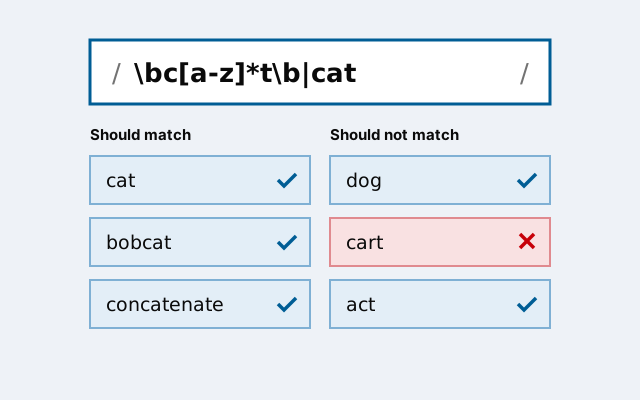
The pattern cat finds the letters c, a, t in a row, anywhere in the text. It matches "cat", "concatenate" and "bobcat". By default the search is case-sensitive, so it does not match "Cat".
A few characters have special meanings: . ^ $ * + ? ( ) [ ] { } | \. To match one of them literally, put a backslash before it. \. is a real full stop, while . on its own matches any single character.
Anchors: where the match must be
^ means the start of the text and $ the end. ^pre matches "prefix" but not "spread"; \.js$ matches "app.js" but not "app.jsx".
Use both to describe a whole string: ^\d{3}$ is exactly three digits and nothing else. Leaving the anchors off is the most common reason a pattern matches more than you meant.
Character classes: one character from a set
Square brackets match any one character listed inside them. gr[ae]y matches "gray" and "grey". A hyphen makes a range: [0-9a-f] is one hex digit. A caret straight after the opening bracket turns it around: [^aeiou] is one character that is not a lowercase vowel.
\dis a digit, the same as[0-9].\wis a word character: a letter, digit or underscore.\sis whitespace: a space, tab or newline.\D,\Wand\Sare the opposites.
Repetition: how many times
A count applies to the one thing just before it, which can be a character, a class or a group in parentheses.
?means zero or one:colou?rmatches "color" and "colour".*means zero or more, and+one or more.{3}means exactly three,{2,4}two to four, and{2,}two or more.
Repeats are greedy: they take as much as they can and give back only what they must. ".*" run on "a" and "b" matches the whole thing from the first quote to the last. Add ? to make a repeat lazy, so ".*?" stops at the first closing quote. Often clearer still is a class that cannot run past the end: "[^"]*".
Groups and alternation
Parentheses group part of a pattern so a count or a choice applies to all of it. (ab)+ matches "ab", "abab" and so on. A vertical bar chooses between alternatives: cat|dog matches either word.
Alternation covers everything on each side of the bar, so ^cat|dog$ means "cat at the start, or dog at the end". To choose between whole words, group them: ^(cat|dog)$.
A group also remembers what it matched, and \1 matches the same text again. (\w)\1 finds a doubled letter, as in "book" or "apple".
Word boundaries
\b matches no characters at all. It marks the edge of a word: a point with a word character on one side and not on the other. \bend\b matches "the end" but not "pending" or "endless".
Lookarounds: checking without matching
A lookahead checks what comes next without using it up. foo(?!bar) matches "foo" when it is not followed by "bar". (?=...) is the positive version.
Because a lookahead uses up nothing, you can stack several at the start of a pattern to check different things about one string: ^(?=.*[a-z])(?=.*\d).{8,}$ means at least eight characters, with at least one lowercase letter and one digit.
Lookbehinds, (?<=...) and (?<!...), look at what comes before. Most modern regex engines support them, including JavaScript, Python and Java.
Mistakes that catch everyone
- Forgetting anchors, so the pattern matches inside a longer string.
- Using
.for a full stop. It matches any character, soa.bmatches "axb". - Writing
[cat|dog], which is one character from the set c, a, t, |, d, o, g. Alternation goes in parentheses, not brackets. - Nesting repeats like
(a+)+on text that almost matches. The engine tries every way to split the text, which can take practically forever. This is called catastrophic backtracking. - Trying to parse nested structures such as HTML with one regex. Regex is for flat patterns; use a real parser for nesting.
How to practise
Regex sticks when you use it on small, real problems: file names, dates, prices, log lines. Start with the strings you do not want to match, because they show you what the pattern must avoid. Regex Runner has 24 such puzzles in three packs, checked live as you type.